For laser cutters, vinyl cutters and CNC machines
Laser-cut and vinyl designs as SVG and DXF, from a description
Tell your AI assistant the shape in millimetres: the outline, the holes and where they go. The 3D studio builds the outline as exact geometry, measures it and hands you an .svg and a .dxf for your cutting software.
Connect your assistant About the 3D studio
https://pilot.legit2compute.com/mcp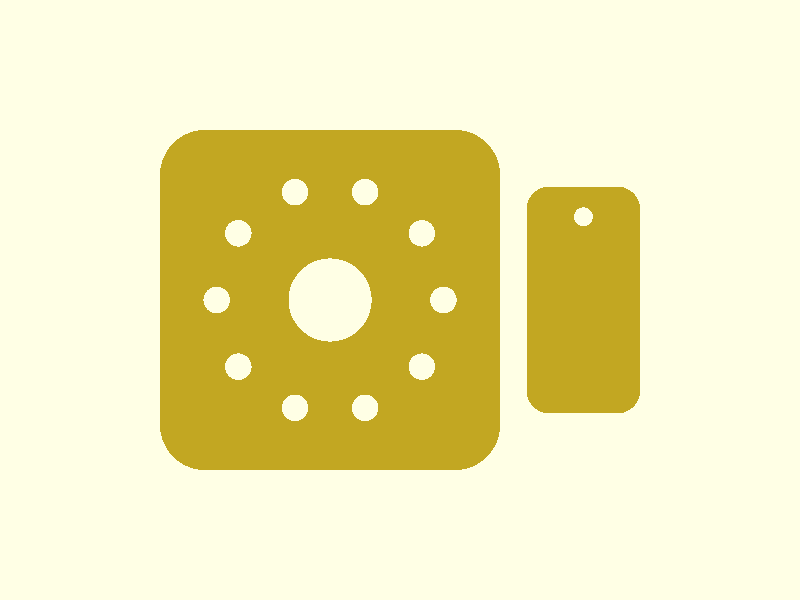
Who it is for
A laser cutter, a vinyl cutter and a CNC all want the same thing: a clean outline at the right size. Drawing one in a vector program is quick if you use it every week and slow if you do not, and a design traced from a picture is rarely the size you meant.
This page is for people who know the numbers and would rather say them. A coaster 90 mm across with a 22 mm hole in the middle is a sentence, and your assistant can turn that sentence into a file that comes back with its measured size.

How it works
Your assistant writes the outline as OpenSCAD code: circles, rounded rectangles and the spacing between them, with your dimensions in it. The studio builds it. A shape with no thickness is exported flat instead of as a solid, so what comes back is not a 3D model but two cut files:
- An .svg in millimetres, for cutting software that opens SVG.
- A .dxf of the same outlines, for software that wants DXF.
- The measured width and height of the whole design, and the number of outlines in it, so you can check both against what you asked for.
- OpenSCAD's own warnings, which your assistant reads and fixes instead of guessing.
A design we measured
We asked for a 90 mm coaster with ten 7 mm holes on a 30 mm ring and a 22 mm centre hole, plus a 30 x 60 mm key tag cut from the same sheet. Then we asked for a bigger one.
| Asked for | Built in | Measured |
|---|---|---|
| 90 mm coaster with ten holes, and the key tag | 1.8 seconds | 127.00 x 90.00 mm, 14 outlines |
| 110 mm coaster with 14 holes, and the key tag | 1.9 seconds | 147.00 x 110.00 mm, 18 outlines |
The files were coaster.svg and coaster.dxf. Four more holes gave four more outlines, and the height of the design is the size of the coaster. Numbers like these are how you catch a mistake before it reaches the material.
What to say
- The outside. Its size in millimetres and its shape: a circle, a rectangle, rounded corners and their radius.
- The holes. How many, what diameter, and where: on a ring, in a row, or so far from an edge.
- More than one piece. Ask for them side by side and say the gap between them.
- Kerf. If you want the cut width allowed for, give the kerf and ask for an offset.
- Text. Ask for it as outlines, so it is cut geometry and not a font your software has to find.
Changing the design
The design is kept under its name with the values it was built from. "Make the coaster 110 mm with 14 holes" rebuilt ours in 1.9 seconds, with new files and new measurements. Your studio's files come back the next time your assistant opens it, and are deleted 30 days after it was last closed.
Need thickness as well? The same studio makes solid parts for a printer from a description: brackets, clips and adapters, an enclosure for a circuit board, or a replacement part. What is installed is listed on the OpenSCAD MCP server page.
What it does not do
- Outlines only. The files hold cut lines. There are no engraving fills and no colours by layer.
- No kerf compensation by itself. You get the exact outline unless you ask for an offset and give the kerf.
- No nesting. Parts are placed side by side as you ask; the studio does not pack many parts onto a sheet for you.
- Text only as outlines, and only when you ask for it.
Logos and labels delivered as PDF and PNG come from a separate vector-art tool in the same studio.
Things to ask for
What it costs
Studio time, parts, draft pictures, vector art and exports are not charged. The first 5 finished renders on an account are free. After that a render is paid from your credit balance when it starts, and refunded if it fails.
| Finished render | Draft | Good | Best |
|---|---|---|---|
| Still, up to 1080p | $0.01 | $0.03 | $0.06 |
| Still, 4K | $0.04 | $0.12 | $0.24 |
| Video, per frame at 720p | $0.005 | $0.01 | $0.02 |
| Video, per frame at 1080p | about $0.011 | about $0.023 | $0.045 |
One video job is at most 300 frames. A 3-second draft turntable at 720p and 24 frames a second is 72 frames: $0.36. Add credits on your account page.
Questions
Which file formats do I get?
An .svg and a .dxf of the same outlines. The SVG is in millimetres. The measured width and height come back with the files, so you have a number to check after importing them into your cutting software.
Does it allow for kerf?
Not unless you ask. The outline is the exact geometry you described. Give your kerf and ask for an offset, and the design is rebuilt with it.
Can it make engraving fills or separate colours for cut and engrave?
No. The files hold outlines, which are cut lines. There are no fills and no colours by layer.
Can it nest many parts onto one sheet?
No. It places parts side by side with the gap you ask for. Packing a sheet tightly is a job for your cutting software.
Can it cut text?
Yes, if you ask for the text as outlines. It then becomes geometry in the file like any other shape.
Which assistants can use it?
Any assistant that can add a remote connector (the MCP standard) with sign-in. ChatGPT, Claude and Codex support that standard. You add one address and allow the connection from your legit2compute account.
What does it cost?
Studio time, parts, draft pictures, vector art and exports are not charged. The first 5 finished renders on an account are free. After that a render is paid from your credit balance when it starts, and refunded if it fails. A still up to 1080p is $0.01 at draft quality, $0.03 at good and $0.06 at best; a 4K still is four times that. Video is $0.005, $0.01 or $0.02 per frame at 720p, and 2.25 times that at 1080p.
More: The 3D studio · Hosted Blender MCP server · OpenSCAD MCP server · AI product renders
Things to make: AI 3D print design · Gridfinity bin generator · 3D printed enclosure generator · Replacement parts to 3D print
Updated 2026-11-24.